📓4.12: 2D Array Traversals
Table of Contents
📖 This page is a condensed version of CSAwesome Topic 4.12
Traversing 2D Arrays with Nested Loops
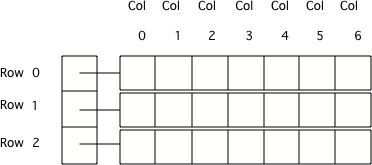
Since 2D arrays are really arrays of arrays, you can use nested loops to iterate through all elements in an array. We first loop through each of the rows (the “inner arrays”), and then loop through all the values inside each inner array.
Enhanced For-Each Loops
An enhanced for-each loop “visits” each item in an array sequentially. Notice the type of the outer loop array variable - it is an array that will hold each row, String[] in the example below for a 2D String array. The type of the variables in the for-each loops must match the type of the array.
String[][] data;

// ENHANCED FOR-EACH nested loops to traverse 2D array
for (String[] rowArray : data) {
  for (String colValue : rowArray) {
    System.out.println(colValue);
  }
}
In this case the
for (String[] rowArray : array)means to loop through each element of the outer array (data) which will set the currentrowArrayto the current array of columns. Then the inner loop iterates through the inner array (the current “column”), printing each of the values (colValue).
DATA TYPES: To traverse with enhanced for-each loops, the variable of the outer loop must be the type of each row - which is a 1D array. The inner enhanced for loop variable must be the same type as the elements stored in the array.
Standard For Loops
When writing nested loops to traverse a 2D array, for-each loops like above are much simpler since you don’t have to use the indices and the []’s, but you can only use them if you are NOT going to modify the values in an array.
If you do need to change values, or keep track of the index for another reason, stick to a standard (indexed) for loop:
// STANDARD/INDEXED FOR nested loops to traverse 2D array
for (int row = 0; row < data.length; row++) {
  for (int col = 0; col < data[row].length; col++) {
    System.out.println(data[row][col]);
  }
}
array.lengthprovides the number of rows in a 2D arrayarray[0].lengthprovides the number of columnsThe length of the inner array (
array[0]is the first row)
Looping through a Subset
You can loop through a subset (smaller portion) of a 2D array as long as you use a standard for loop. You just change the starting and ending bounds for your loops:
int[][] matrix = { {3, 2, 3}, {4, 3, 6}, {8, 9, 3}, {10, 3, 3}};

for (int row = 1; row < 3; row++) {
  for (int col = 0; col <= 2; col++) {
    System.out.println(matrix[row][col]);
  }
}
💬 DISCUSS: What do you think the above code will print out? Which part of the
matrix2D array?
⭐️ Summary
-
(AP 4.12.A.1) Nested iteration statements (loops) are used to traverse and access all or an ordered sequence of elements in a 2D array. Since 2D arrays are stored as arrays of arrays, the way 2D arrays are traversed using
forloops and enhancedforloops is similar to 1D array objects. -
(AP 4.12.A.1) Nested iteration statements can be written to traverse the 2D array in row-major order, column-major order, or a uniquely defined order. Row-major order refers to an ordering of 2D array elements where traversal occurs across each row, whereas column-major order traversal occurs down each column.
-
(AP 4.12.A.2) The outer loop of a nested enhanced
forloop used to traverse a 2D array traverses the rows. Therefore, the enhancedforloop variable must be the type of each row, which is a 1D array. The inner loop traverses a single row. Therefore, the inner enhancedforloop variable must be the same type as the elements stored in the 1D array. Assigning a new value to the enhancedforloop variable does not change the value stored in the array. -
The 2D array’s length gives the number of rows. A row’s length array[0].length gives the number of columns.
Acknowledgement
Content on this page is adapted from Runestone Academy - Barb Ericson, Beryl Hoffman, Peter Seibel.