📓4.3: Array Creation & Access
Table of Contents
📖 This page is a condensed version of CSAwesome Topic 4.3
✴✴✴ NEW UNIT/SECTION! ✴✴✴
Create a blank Java program to take your class notes in for the next few lessons.
Click on the collapsed heading below for GitHub instructions ⤵
📓 NOTES PROGRAM SETUP INSTRUCTIONS
- Go to the public template repository for our class: BWL-CS Java Template
- Click the button above the list of files then select
Create a new repository - Specify the repository name:
CS2-Unit4PartA-Notes - For the description, write:
1D Array data collections, using text files - Click
Now you have your own personal copy of this starter code that you can always access under the
Your repositoriessection of GitHub! 📂 - Now on your repository, click and select the
Codespacestab - Click
Create Codespace on mainand wait for the environment to load, then you’re ready to code! - 📝 Take notes in this Codespace during class, writing code & comments along with the instructor.
🛑 When class ends, don’t forget to SAVE YOUR WORK! Codespaces are TEMPORARY editing environments, so you need to COMMIT changes properly in order to update the main repository for your program.
There are multiple steps to saving in GitHub Codespaces:
- Navigate to the
Source Controlmenu on the LEFT sidebar - Click the button on the LEFT menu
- Type a brief commit message at the top of the file that opens, for example:
updated Main.java - Click the small
✔️checkmark in the TOP RIGHT corner - Click the button on the LEFT menu
- Finally you can close your Codespace!
Array Creation and Access
To keep track of 10 exam scores, we could declare 10 separate variables: int score1, score2, score3, … , score10; But what if we had 100 exam scores? That would be a lot of variables!
📋 Most programming languages have a simple data structure for a collection of related data that makes this easier. In some programming languages, this is called a list. In Java and many programming languages, this is called an array.
- Array
- A block of memory that stores a collection of data items (elements) of the same type under one variable name.
Arrays are useful whenever you have many elements of data of the same type that you want to keep track of, but you don’t need to name each one. Instead you use the array name and a number (called an index) for the position of an item in the array.
You can make arrays of ints, doubles, Strings, and even object classes that you have written like Students.
- Index
- An integer that represents a location in a collection such as an Array. In Java, the first element in an array is stored at index
0.
📺 Here’s a video that introduces the concept of an array and gives an example:
ANALOGY
An array is like a row of small lockers, except that you can’t cram lots of stuff into it. You can only store one value at each locker:

An array index is like a locker number. It helps you find a particular place to store your stuff and retrieve stuff. You can get or store a value from or to an array using its index.
Arrays and lists in most programming languages start counting elements from the number 0, so the first element in an array is at index 0. This is similar to how Strings are indexed in Java – the first character is at index 0.
💬 DISCUSS: Can you think of another example of something that is like an array?
Declaring an Array
When we declare a variable, we specify its type and then the variable identifier (name). To make a variable into an array, we put square brackets after the data type:
   // Declaration for a single int variable
   int score;
   // Declaration for an ARRAY of ints
   int[] scores;
For example,
int[] scoresmeans we have an array calledscoresthat containsinttype values.
The declarations do not create the actual array. Arrays are objects in Java, so any variable that declares an array holds a 👉 reference to an object. If the array hasn’t been created yet and you try to print the value of the variable, it will print null (meaning it doesn’t reference any object yet).
There are two ways to create an array. You can use the keyword new to get new memory or use an initializer list to set up the values in the array.
Watch the following which shows the two ways of creating an array with a physical model of Java memory.
Using new to Create Empty Arrays
To create an empty array after declaring the variable, use the new keyword with the type and the size of the array (the number of elements it can hold). This will actually create the array in memory. You can do the declaration and the creation all in one step, see the String array names below. The size of an array is set at the time of creation and cannot be changed after that.
  //declare an array variable
  int[] highScores;
  // create the array
  highScores = new int[5];
  // declare and create array in 1 step!
  String[] names = new String[5];
Add two more array declarations:
- One that creates an array of 5 doubles called
prices - Another array of 5 Strings called
names.
What happens in the computer’s memory when you declare arrays?
Array elements are initialized to default values like the following:
0for elements of typeint0.0for elements of typedoublefalsefor elements of typebooleannullfor elements of typeStringor any other object
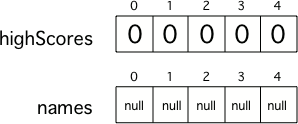
Two 5 element arrays with their values set to the default values for integer and object arrays.
Initializer Lists to Create Arrays with Values
Another way to create an array is to use an initializer list. You can initialize (set) the values in the array to a list of values in curly braces ({}) when you create it, like below. In this case you don’t specify the size of the array, it will be determined from the number of values that you specify.
  int[ ] highScores = {99,98,98,88,68};
  String[ ] names = {"Jamal", "Emily", "Destiny", "Mateo", "Sofia"};
When you create an array of a primitive type (like int) with initial values specified, space is allocated for the specified number of items of that type and the values in the array are set to the specified values. When you create an array of an object type (like String) with initial values, space is set aside for that number of object references. The objects are created and the object references set so that the objects can be found.
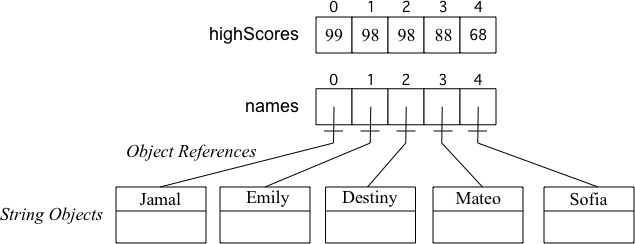
📺 Watch the following video which shows an array of String objects with a physical model of Java memory:
Array Length
Arrays know their length (how many elements they can store). It is a public read-only instance variable so you can use dot-notation to access the instance variable (arrayName.length).
Dot-notation is using variable name followed by a
.and then the instance variable (property) name or a method name.
System.out.println(highScores.length);
Try adding another value to the
highScoresinitializer list and run again to see thelengthvalue change.
Note that length is an instance variable and not a method, unlike the String length() method, so you don’t add parentheses after length. The length instance variable is declared as a public final int. public means you can access it and final means the value can’t change.
Access and Modify Array Values
To access the items in an array, we use an indexed array variable which is the array name and the index inside of square bracket [ ]. Remember that an index is a number that indicates the position of an item in a list, starting at 0.
An indexed variable like arrayname[index] can be used anywhere a regular variable can be used, for example to assign a new value or to get a value from the array like below.
  // assign a new value 99 to the first element in the array
  highScores[0] = 99;
  // print the first element of the array
  System.out.println( highScores[0] );
The first value in an array is stored at index 0 and the index of the last value is the length - 1 (since length is the number of items and the starting index is 0). Use arrayname[index] to access or modify array items.
Watch the following which shows a physical model of Java memory setting array values.
Parallel Arrays
If you want to keep track of the top 5 highest scores in a game and the names of the people with those scores, you could use two parallel arrays. One array could keep track of the scores and the other the names.
With parallel arrays, you have to make sure you keep them in the same order so that the same index can be used to get correponding names and scores.
Try out the following code which has two parallel arrays, highScores and names.
- Can you print out Mateo’s score?
- Can you change Sofia’s score to 97 using an assignment statement in the code?
- Can you modify the arrays so that they have 6 elements, add your name and score, and print them out?
public static void main(String[] args) {
    // declare, create, initialize arrays
    int[] highScores = {99, 98, 98, 88, 68};
    String[] names = {"Jamal", "Emily", "Destiny", "Mateo", "Sofia"};

    // Print corresponding names and scores
    System.out.println(names[0] + " has a score of " + highScores[0]);
    System.out.println(names[1] + " has a score of " + highScores[1]);
}
💬 DISCUSS: What happens if you try to access an element that is not there? Try to access a
highScoreornameat index 7 above to see what happens. The index must be between 0 and the length of the array - 1 or it will give an error message calledArrayIndexOutOfBoundsException.
⚠️ Using an index value outside of the range 0 - (length-1) will result in an ArrayIndexOutOfBoundsException being thrown.
One powerful feature in the array data abstraction is that we can use variables for the index! As long as the variable holds an integer, we can use it as an index:a
  // use a variable for the index
  int index = 3;
  System.out.println(  highScores[index] );
🗺 In-Class Challenge: Countries Arrays
🎲 Practice Game: Array Indices
Try the game below to practice! Click on Arrays and click on the element of the * array that would be printed out by the given code. If you’re stuck, check on Labels to see the indices. We encourage you to work in pairs and see how high a score you can get.
⭐️ Summary
- (AP 4.3.A.1) An array stores multiple values of the same type. The values can be either primitive values or object references.
- (AP 4.3.A.2) The length (size) of an array is established at the time of creation and cannot be changed. The length of an array can be accessed through the
lengthattribute. - (AP 4.3.A.3) When an array is created using the keyword
new, all of its elements are initialized to the default values for the element data type. The default value forintis0, fordoubleis0.0, forbooleanisfalse, and for a reference type (likeStringor a class you have created) isnull. - (AP 4.3.A.4) Initializer lists can be used to create and initialize arrays.
- (AP 4.3.A.5) Square brackets
[]are used to access and modify an element in a 1D (one dimensional) array using an index. - (AP 4.3.A.6) The valid index values for an array are
0through one less than the length of the array, inclusive. Using an index value outside of this range will result in anArrayIndexOutOfBoundsException.
Acknowledgement
Content on this page is adapted from Runestone Academy - Barb Ericson, Beryl Hoffman, Peter Seibel.